JustCallEnglishSales demo
A sales demo for a team using HubSpot
A buyer asked how calls and follow-ups fit into HubSpot. DemoPage chose and narrated the relevant public pages. No form or product action was submitted.
Stop making buyers wait days for a first call just to see your product. DemoPage shows visitors around your real product, answers their questions from your own pages in their language, and sends your team a warm lead.
Never pays · signs anyone up · changes your CRM · makes calls
Acme Voice demo
Waiting room
Chat
Acme Voice
Company
Problem
Uses
Wants to see
Illustration of a demo page. Acme Voice is a sample product.
Connects to
17
languages, each with a native voice
50–80 s
for a live demo of a public website, measured
0
payments, sign-ups, or changes the demo can make
1 click
for your team to step in during a demo
01How it works
Sign up with your work email. DemoPage reads your website from your domain, maps your key pages, and records a baseline walkthrough. Add a sandbox login anytime for signed-in screens.
Their work email, the tool they use today, and what they want to solve—in their own words, right behind your demo button.
DemoPage opens your real product, walks the screens that fit their ask, answers questions from your approved pages, and lets them point at anything on screen or click around themselves.
You get who they are, what they saw and asked, and a shareable recap link. DemoPage never pays, signs up, or saves anything in your product—closing stays with your team.
On your website
Visitors say what they want to solve and watch an instant recording or step into a live browser walkthrough—instead of waiting days for a discovery call.
Before the first call
When a lead lands in HubSpot, Salesforce, or Zapier, DemoPage automatically records a tailored walkthrough around their stack before your rep says hello.
For the buying group
Every session creates a clean share pack with the recording, pages shown, and cited answers so your buyer can bring their boss and team along.
02Use cases
The visitor writes
Company
Northwind
Problem
Reps dial from cell phones. Nothing lands in HubSpot.
Uses
HubSpot
Wants to see
Calling and an AI voice agent
A buyer clicks your demo button at 9pm. Instead of waiting two days for a discovery call, they see your real product right away—walked around their stack and their problem. Your reps spend their calendar on buyers who have already seen it work.
See the sales demos use caseDemoPage walks
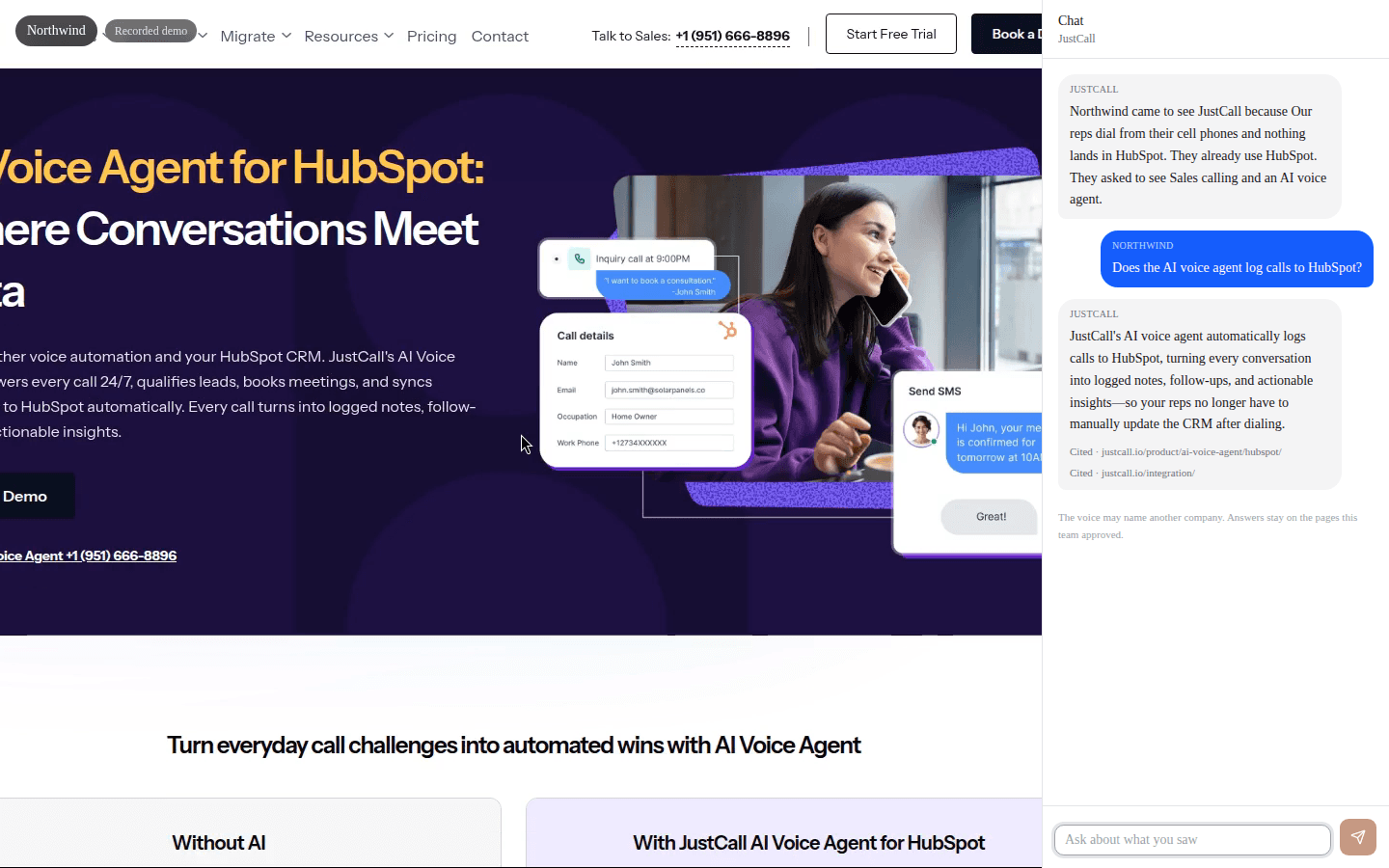
Asked: “Does the voice agent log calls to HubSpot?”
Yes. The HubSpot page says every call turns into logged notes and follow-ups on the contact.
Pre-call demos for inbound leads
When a lead hits HubSpot, Salesforce, or Zapier, DemoPage records a tailored walkthrough before your rep even says hello.
Champion share packs
After a demo, buyers get a clean recap link with the recording and cited answers to forward to their team.
Partner & reseller enablement
Give every channel partner their own demo link so they can show your product accurately without waiting on your team.
Release & sign-up checks
See your pricing, sign-up, and core flows the way a new visitor does after every release.
03Not a mockup
This one ran on JustCall's public website for one visitor: a sales team on HubSpot that wants an AI voice agent. It opened the voice-agent page, the sales-team page, the integrations, and the platform, in that order. Nothing was submitted.
Recorded examples
These are real browser recordings with generated narration—not product mockups. Each starts and ends with its DemoPage attribution.
A buyer asked how calls and follow-ups fit into HubSpot. DemoPage chose and narrated the relevant public pages. No form or product action was submitted.
La voz y la explicación están en español; las páginas públicas conservan el idioma en que JustCall las publicó.
A DemoPage walkthrough of its own public product, pricing, and ROI pages.
A privacy-reviewed demo-workspace recording with an empty schedule, synthetic account identity, and no customer records or changes.
A simple explanation using actual pages from arXiv:2307.13854v3. Author-reported benchmark results are labeled separately from DemoPage's interpretation.
JustCall is shown from public website pages as an independent example; this does not imply affiliation or endorsement.
DemoPage on YouTube04Languages
The demo starts in the visitor's browser language, or they pick one of 17 from the menu. The voice, the chat, and the answers all switch. Recordings keep the language they were made in.
05Guardrails
Every answer comes from your own website, with a link to the page. If someone asks about a price you haven't published, a discount, or your roadmap, or tries to trick it, it doesn't guess. It passes the question to your team.
Visitors ask
06Integrations
Connect the tools you already use. They tell DemoPage about new leads and booked meetings, and DemoPage never changes records in them.
HubSpot
contact.readyA workflow tells DemoPage a contact wants a demo.
Salesforce
contact.readyA flow sends the lead or contact.
Zapier
any eventConnect DemoPage to the other apps you already use.
Calendar
meeting.bookedKnow when a meeting with a person is booked.
Chili Piper
meeting.bookedYour booking tool books the time, and DemoPage knows.
MCP
8 toolsYour AI assistant can look up demo links and log events for you.
For every team
One live demo, and something each team has been asking for. Pick a team to see what changes for them.
Why buyers love it
The problem, as they'd put it
“I just want to see it. Not a form, a calendar, and a call next Tuesday.”
The number they watch
Time from asking to seeing the product
Why teams switch
07ROI
Team time returned each month
$22,000
100 hours across 100 first demos
08Pricing
Free
$0/ month
Prove it with real buyers, on one product.
Starter
From $99/ month
One product, in every language. $99 for 10 live demos, then $9 each, in packs of 10.
Growth
Most teamsFrom $799/ month
The demo connected to how you sell. $799 for 100 live demos, then $7 each, in packs of 50.
Scale
From $1,999/ month
More products, and more live demos at once. $1,999 for 300 live demos, then $6 each, in packs of 100.
Enterprise is priced with you for 600 or more live demos a month, with a contract and reserved rooms. See pricing
Sign up with your work email. DemoPage reads your website, you choose what it may show, and your demo link is ready. No card needed for the free trial.